
Website Content Audit Checklist
Essential to keep your website current and relevant
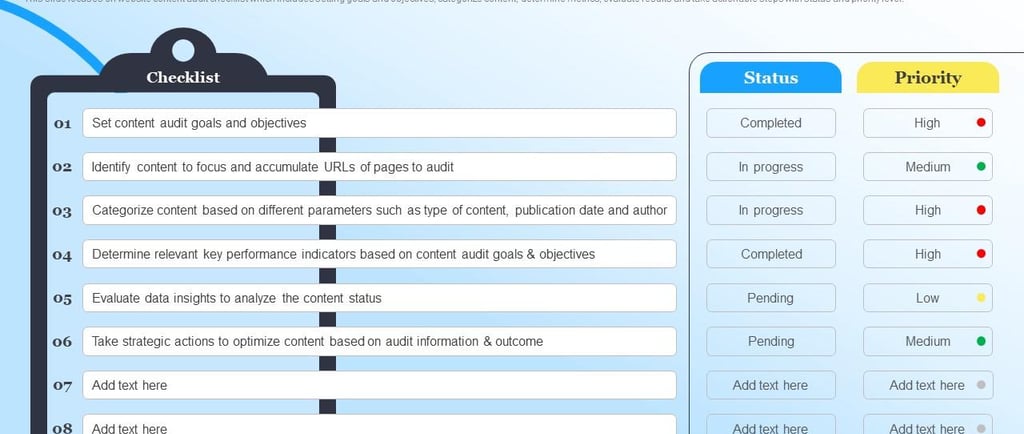
Website Content Audit Checklist
A website is never truly "finished." As your business evolves, customer expectations change, and search engines update their algorithms, your content needs regular attention. A website content audit provides a structured way to review your existing content, identify gaps, and create a plan for improvement.
Whether you're managing a small business website, an eCommerce store, or a large corporate site, this checklist will help you perform a comprehensive content audit.
What Is a Website Content Audit?
A website content audit is the process of reviewing and evaluating all the content on your website. This includes:
Blog posts
Landing pages
Product pages
Service pages
FAQs
Resource pages
Images and videos
Downloadable content
The goal is to determine whether each piece of content should be kept, updated, consolidated, redirected, or removed.
Website Content Audit Checklist
1. Create a Complete Content Inventory
Start by listing every URL on your website.
Include:
Page title
URL
Content type
Publication date
Last updated date
Author (if applicable)
This inventory becomes the foundation of your audit.
2. Review Content Quality
Ask yourself:
Is the information accurate?
Is it up to date?
Does it answer the user's search intent?
Is it easy to read?
Does it provide real value?
Are there grammar or spelling mistakes?
Update outdated facts, statistics, screenshots, and examples.
3. Check SEO Performance
Evaluate each page for SEO best practices.
Review:
Title tag
Meta description
Heading structure (H1–H3)
Target keywords
Keyword placement
Internal links
External links
Image alt text
URL structure
Look for opportunities to improve rankings without keyword stuffing.
4. Analyze Traffic and Engagement
Review website analytics to understand how visitors interact with your content.
Track metrics such as:
Page views
Organic traffic
Bounce rate
Average engagement time
Conversion rate
Exit rate
Identify pages that consistently perform well and pages that require improvement.
5. Identify Outdated Content
Remove or refresh content that contains:
Old statistics
Expired promotions
Discontinued products
Broken screenshots
Outdated recommendations
Irrelevant information
Fresh content signals quality to both users and search engines.
6. Find Duplicate Content
Duplicate pages can confuse search engines and dilute rankings.
Look for:
Similar blog posts
Duplicate product descriptions
Multiple pages targeting the same keyword
Repeated service pages
Merge similar content when appropriate.
7. Check Internal Linking
Every important page should connect naturally with related content.
Ensure:
Important pages receive enough internal links
Broken internal links are fixed
Anchor text is descriptive
Orphan pages are connected
Strong internal linking improves navigation and SEO.
8. Test External Links
Verify that all external links:
Work correctly
Point to trustworthy sources
Open the intended page
Are still relevant
Replace or remove broken links.
9. Optimize Images and Media
Review every visual asset.
Check for:
High-quality images
Proper file names
Descriptive alt text
Compressed file sizes
Mobile responsiveness
Fast loading speeds
Large media files can slow down your website.
10. Evaluate Readability
Content should be easy to scan.
Improve readability by:
Using short paragraphs
Adding headings
Including bullet points
Highlighting key information
Using simple language
Breaking up long sections
Readable content keeps visitors engaged.
11. Check Mobile Experience
Many users browse on mobile devices.
Review:
Mobile layout
Font size
Button spacing
Navigation
Images
Tables
Interactive elements
Your content should be easy to consume on every screen size.
12. Verify Calls-to-Action (CTAs)
Every important page should guide visitors toward a desired action.
Examples include:
Contact Us
Request a Quote
Subscribe
Download a Guide
Buy Now
Book a Demo
Ensure CTAs are visible, relevant, and functional.
13. Review Accessibility
Accessible websites serve a wider audience and support compliance with accessibility standards.
Check:
Alt text for images
Color contrast
Keyboard navigation
Descriptive link text
Proper heading hierarchy
Form labels
Accessibility improvements also enhance usability.
14. Improve Page Performance
Slow pages can hurt both rankings and user experience.
Review:
Page load speed
Image optimization
Caching
Unused scripts
Core Web Vitals
Mobile performance
Prioritize pages with high traffic or conversion potential.
Bonus Tips for a Successful Content Audit
Schedule audits at least twice a year.
Prioritize high-traffic and high-conversion pages first.
Document every change you make.
Monitor performance after updates.
Create a content calendar to keep information fresh.
Review competitor content to identify opportunities.
Common Content Audit Mistakes to Avoid
Avoid these common pitfalls:
Auditing without clear goals
Ignoring analytics data
Deleting pages without checking backlinks
Forgetting to update internal links
Overlooking mobile usability
Neglecting accessibility
Focusing only on SEO instead of user value
Final Thoughts
A website content audit is one of the most effective ways to improve your site's performance, user experience, and search visibility. By regularly reviewing your content, fixing outdated information, optimizing SEO elements, and removing low-value pages, you can build a website that remains relevant and competitive.
Use this checklist as a repeatable process rather than a one-time project. Consistent audits help ensure every page on your website supports your business objectives, meets user needs, and contributes to long-term growth.