
How to Organize Business Information So Customers Can Find What They Need
Attract new clients
How to Organize Business Information So Customers Can Find What They Need
When potential customers visit your website, they want answers fast. If they can't quickly find your services, business hours, pricing, or contact information, they're likely to leave and visit a competitor instead.
Organizing your business information isn't just about making your website look neat—it's about creating a seamless customer experience that builds trust, improves search engine rankings, and helps convert visitors into paying customers.
Why Organized Business Information Matters
A well-organized website helps customers:
Find answers quickly
Contact your business with ease
Understand your products and services
Feel confident in your professionalism
Complete purchases or book appointments faster
Search engines also favor websites that are well-structured, making it easier for your pages to appear in relevant search results.
Start with Your Customers' Most Common Questions
Think about what customers usually want to know before they decide to do business with you. Your website should make it easy to find:
Products or services
Pricing or estimates
Business hours
Location and directions
Phone number and email address
Online booking or ordering options
Frequently asked questions
The fewer clicks it takes to find this information, the better.
Create a Simple Website Navigation
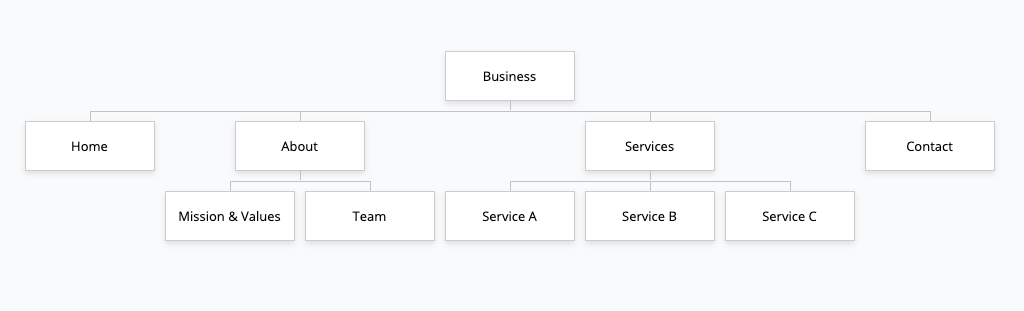
Your navigation menu should be easy to understand. Instead of using clever names, choose clear labels that visitors immediately recognize.
A typical business website includes:
Home
About
Services
Products
Pricing
Blog
FAQs
Contact
If your business offers multiple services, organize them into categories rather than listing everything in one long menu.
Make Contact Information Easy to Find
One of the biggest frustrations for customers is searching for contact information.
Include your:
Phone number
Email address
Physical address
Business hours
Contact form
Google Map (if applicable)
Display this information on your Contact page and in your website's footer so it's accessible from every page.
Use Clear Headings and Short Sections
Most visitors scan webpages rather than reading every word.
Improve readability by using:
Descriptive headings
Short paragraphs
Bullet points
Numbered lists
Bold text for important details
Plenty of white space
This makes your content easier for both users and search engines to understand.
Keep Your Information Updated
Nothing damages credibility faster than outdated information.
Review your website regularly to ensure your:
Hours are current
Prices are accurate
Staff information is updated
Services are still available
Phone numbers and email addresses work properly
A quick website review every few months can prevent customer frustration.
Organize Your Services Clearly
Instead of placing every service on one page, create dedicated pages for each major service or product.
This helps customers:
Find exactly what they need
Learn more about specific offerings
Navigate your website more easily
It also gives search engines more opportunities to rank your pages for relevant keywords.
Optimize for Mobile Users
More than half of all website traffic comes from smartphones.
Your website should:
Load quickly
Display properly on small screens
Use buttons that are easy to tap
Feature readable text
Keep menus simple
A mobile-friendly website improves both customer satisfaction and search engine performance.
Add a Search Feature
If your website contains a large number of pages, products, or articles, adding a search bar can significantly improve the user experience.
Visitors can quickly locate the exact information they need instead of navigating through multiple pages.
Include Helpful Resources
Go beyond the basics by creating content that answers customer questions.
Helpful resources may include:
Frequently Asked Questions
Blog articles
Buying guides
How-to tutorials
Customer testimonials
Case studies
These resources build trust while improving your website's SEO by targeting additional search terms.
Improve Local Search Visibility
If you serve a specific geographic area, make sure your business information is consistent across your website and online listings.
Include:
Your business name
Address
Phone number
Service areas
Business hours
Consistent information helps customers find your business and supports better visibility in local search results.
Final Thoughts
An organized website makes it easier for customers to find answers, contact your business, and take action. Clear navigation, updated information, and a mobile-friendly design create a better user experience while supporting your search engine optimization efforts.
The easier it is for people to find what they need, the more likely they are to become satisfied, loyal customers. Investing time in organizing your business information today can lead to stronger customer relationships, improved online visibility, and increased business growth.